CloudFix Feature
S3 Intelligent-Tiering Savings: When It Cuts Storage Costs by 40–68%
S3 Intelligent Tiering automatically moves objects between access tiers to cut storage costs by up to 68%. Setup guide, pricing breakdown, cost calculator, and when it works vs when it doesn't.

Part of our complete AWS Storage Cost Optimization guide.
Quick Answer: Yes, for objects you rarely access, S3 Intelligent-Tiering automatically moves them to cheaper tiers and typically saves about 40% after 30 days and 68% after 90 days versus S3 Standard, with no retrieval fees and the same millisecond latency. The only caveat is a small monitoring fee ($0.0025 per 1,000 objects/month), so it pays off on larger buckets and not on tiny ones you access constantly.
S3 Intelligent Tiering can cut your AWS storage bill in half. It monitors how often you access each object and automatically moves data to cheaper storage tiers when access drops off. No retrieval fees. No performance hit. No manual lifecycle rules to manage.
Since AWS launched Intelligent Tiering in 2018, customers have saved over $6 billion compared to S3 Standard storage. That’s not marketing fluff, that’s the accumulated savings across millions of buckets. We’ve seen it ourselves at CloudFix, both at our sister companies, and at our customers.
This guide covers how S3 Intelligent Tiering actually works, when to use it, the real cost savings you can expect, and how to enable it across your accounts.
Quick Reference
| Savings: | 40% after 30 days, 68% after 90 days (automatic) |
| Retrieval fees: | None (instant access tiers) |
| Monitoring cost: | $0.0025 per 1,000 objects/month |
| Latency: | Same as S3 Standard (milliseconds) |
| Enable: | --storage-class INTELLIGENT_TIERING |
Full pricing · Setup guide · When to use it
What is S3 Intelligent Tiering?
S3 Intelligent Tiering is a storage class that automatically shifts your objects between access tiers based on usage patterns. You don’t need to predict how often data will be accessed or write lifecycle rules. AWS handles the transitions for you.
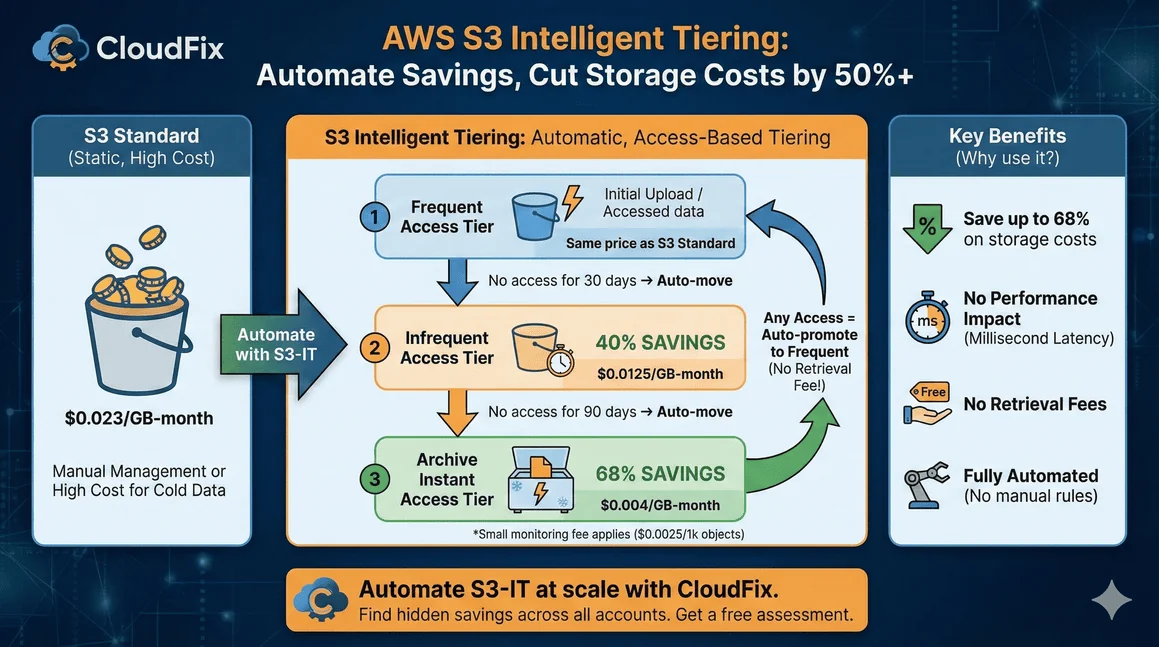
Here’s the basic flow:
- Objects start in the Frequent Access tier (same price as S3 Standard)
- After 30 days without access, they move to Infrequent Access (40% cheaper)
- After 90 days without access, they move to Archive Instant Access (68% cheaper)
When you access an object in a lower tier, it automatically moves back to Frequent Access. No delays, no retrieval fees, no manual intervention.
The only cost is a small monitoring fee: $0.0025 per 1,000 objects per month. For most workloads, the savings far exceed this fee.
The Five Access Tiers
S3 Intelligent Tiering includes five tiers. Three are automatic; two are opt-in for archival workloads.
Automatic Tiers (No Configuration Needed)
| Tier | Moves After | Savings vs S3 Standard | Retrieval Time |
|---|---|---|---|
| Frequent Access | 0% | Milliseconds | |
| Infrequent Access | 30 days | 40% | Milliseconds |
| Archive Instant Access | 90 days | 68% | Milliseconds |
All three automatic tiers have the same latency and throughput as S3 Standard. Your applications won’t notice any difference.
Optional Archive Tiers (Opt-In Required)
| Tier | Moves After | Savings vs S3 Standard | Retrieval Time |
|---|---|---|---|
| Archive Access | 90+ days (configurable) | ~90% | 3-5 hours |
| Deep Archive Access | 180+ days (configurable) | ~95% | Up to 12 hours |
These tiers use Glacier infrastructure. The savings are significant, but retrieval takes hours, not milliseconds. Only enable these if your application can handle asynchronous data access.
Our recommendation: Stick to the automatic tiers unless you have genuine archival data that won’t need quick access. The instant-access tiers deliver substantial savings without changing how your applications work.
S3 is just one of 32 cost optimizations you’re probably missing.
We’ve compiled the highest-impact AWS savings into a single checklist, including storage, compute, database, and networking fixes. Each item includes “how to spot this” guidance.
S3 Intelligent Tiering Pricing (2026)
Current pricing for US East (N. Virginia). Check the AWS pricing page for your region.
Storage Costs
| Tier | Cost per GB/Month | Relative to S3 Standard |
|---|---|---|
| Frequent Access (first 50 TB) | $0.023 | 100% |
| Infrequent Access | $0.0125 | 54% |
| Archive Instant Access | $0.004 | 17% |
| Archive Access | $0.0036 | 16% |
| Deep Archive Access | $0.00099 | 4% |
Monitoring Fee
$0.0025 per 1,000 objects per month
Objects smaller than 128 KB are exempt from monitoring fees and stay in the Frequent Access tier.
No Retrieval Fees
Unlike S3 Glacier storage classes, Intelligent Tiering charges no retrieval fees for the automatic tiers. Access your data whenever you need it at no extra cost.
Real-World Savings Calculation
What does this look like in practice? Based on data from thousands of S3 buckets, here’s a typical distribution once objects settle into their access patterns:
| Tier | Typical Distribution | Per-GB Cost | Monitoring Cost |
|---|---|---|---|
| Frequent Access | 10% | $0.023 | $0.0025 per 1K objects |
| Infrequent Access | 20% | $0.0125 | $0.0025 per 1K objects |
| Archive Instant Access | 70% | $0.004 | $0.0025 per 1K objects |
Let’s run the numbers for 1,000 objects at 1 MB each (1 TB total):
S3 Standard: 1,000 GB × $0.023 = $23.00/month
S3 Intelligent Tiering:
- Frequent Access: 100 GB × $0.023 = $2.30
- Infrequent Access: 200 GB × $0.0125 = $2.50
- Archive Instant: 700 GB × $0.004 = $2.80
- Monitoring: 1,000 objects × $0.0025/1K = $0.0025
- Total: $7.60/month
That’s a 67% reduction in storage costs for data with typical access patterns.
Your savings depend on your actual access patterns. If every object gets accessed within 30 days, you won’t save anything (and you’ll pay the monitoring fee). But that’s rare. Most S3 buckets contain significant amounts of cold data that never gets touched after initial upload.
When to Use S3 Intelligent Tiering
Intelligent Tiering works well for:
- Data lakes and analytics: Query patterns are unpredictable
- User-generated content: Old uploads rarely accessed
- Application logs: Recent logs accessed frequently, older logs rarely
- Backup data: Accessed only during recovery
- Media archives: Some content stays popular, most doesn’t
- Any bucket where you don’t know access patterns: Let AWS figure it out
When NOT to Use S3 Intelligent Tiering
Skip Intelligent Tiering if:
- All data is accessed constantly: You’ll just pay monitoring fees with no savings
- Objects are mostly under 128 KB: Small objects exempt from monitoring, so no automatic tiering
- You have predictable access patterns: Manual lifecycle rules may be cheaper
- You need the lowest possible latency: S3 Express One Zone is faster (but more expensive)
How to Enable S3 Intelligent Tiering
You have three options: set it as the default for new objects, migrate existing objects, or use lifecycle rules.
Option 1: Set Default Storage Class for New Uploads
When uploading objects, specify the storage class:
aws s3 cp myfile.txt s3://mybucket/ --storage-class INTELLIGENT_TIERINGOr set it as the default for your bucket using a bucket policy.
Option 2: Migrate Existing Objects
Copy objects in place with the new storage class:
aws s3 cp s3://mybucket/ s3://mybucket/ --recursive --storage-class INTELLIGENT_TIERINGThis creates new versions of each object with Intelligent Tiering enabled. Note: This generates PUT requests and data transfer within the same region (currently free for same-region transfers).
Option 3: Use S3 Lifecycle Rules
Create a lifecycle rule to transition objects to Intelligent Tiering:
{
  "Rules": [
    {
      "ID": "MoveToIntelligentTiering",
      "Status": "Enabled",
      "Filter": {},
      "Transitions": [
        {
          "Days": 0,
          "StorageClass": "INTELLIGENT_TIERING"
        }
      ]
    }
  ]
}
This automatically moves new objects to Intelligent Tiering on upload. For existing objects, you can set Days: 1 to transition them the day after they’re created.
Option 4: Enforce via Bucket Policy
Block uploads that don’t use Intelligent Tiering:
{
  "Version": "2012-10-17",
  "Statement": [
    {
      "Sid": "RequireIntelligentTiering",
      "Effect": "Deny",
      "Principal": "*",
      "Action": "s3:PutObject",
      "Resource": "arn:aws:s3:::mybucket/*",
      "Condition": {
        "StringNotEquals": {
          "s3:x-amz-storage-class": "INTELLIGENT_TIERING"
        }
      }
    }
  ]
}
S3 Intelligent Tiering vs Lifecycle Rules
You might wonder: why not just use lifecycle rules to move data to cheaper storage classes?
Lifecycle rules work well when:
- You know exactly when data becomes cold
- Access patterns are predictable
- You’re comfortable with retrieval fees (for Glacier classes)
Intelligent Tiering works better when:
- Access patterns are unpredictable
- Some old data might need instant access
- You want zero retrieval fees
- You don’t want to manage lifecycle rule complexity
The key difference: lifecycle rules move data on a schedule you define. Intelligent Tiering moves data based on actual access. If a “cold” object suddenly gets accessed, lifecycle rules don’t know and the object stays in cheap storage with expensive retrieval. Intelligent Tiering automatically promotes it back to the fast tier.
Enabling Archive Tiers (Optional)
The Archive Access and Deep Archive Access tiers are disabled by default. To enable them:
aws s3api put-bucket-intelligent-tiering-configuration
  --bucket mybucket
  --id "ArchiveConfig"
  --intelligent-tiering-configuration '{
    "Id": "ArchiveConfig",
    "Status": "Enabled",
    "Tierings": [
      {
        "Days": 90,
        "AccessTier": "ARCHIVE_ACCESS"
      },
      {
        "Days": 180,
        "AccessTier": "DEEP_ARCHIVE_ACCESS"
      }
    ]
  }'
Warning: Objects in Archive Access take 3-5 hours to retrieve. Deep Archive takes up to 12 hours. Your application code must handle asynchronous retrieval via RestoreObject. Don’t enable these tiers unless you’ve built that capability.
Common Questions
Does Intelligent Tiering affect performance?
No. The Frequent, Infrequent, and Archive Instant Access tiers all deliver the same millisecond latency as S3 Standard. Your application won’t notice any difference.
What’s the monitoring fee?
$0.0025 per 1,000 objects per month. For 1 million objects, that’s $2.50/month. For most workloads, the storage savings exceed this fee within the first month.
Are there retrieval fees?
No retrieval fees for the three automatic tiers. Only the optional Archive and Deep Archive tiers have retrieval costs (similar to S3 Glacier).
What about small objects?
Objects under 128 KB are exempt from monitoring fees and stay in the Frequent Access tier. Intelligent Tiering is most effective for larger objects.
Can I use Intelligent Tiering with S3 Versioning?
Yes. Each version is tiered independently based on its own access patterns.
How do I monitor tier distribution?
Use Amazon CloudWatch metrics or AWS Cost and Usage Reports to see how your data is distributed across tiers.
Does Intelligent Tiering work with S3 Replication?
Yes. Replicated objects use the storage class you specify in the replication rule. You can replicate to Intelligent Tiering in the destination bucket.
The Challenge: Enabling at Scale
Enabling Intelligent Tiering on one bucket is straightforward. Doing it across hundreds of buckets, multiple AWS accounts, and ensuring new buckets use it by default and that’s where it gets complicated.
Most organizations we work with have:
- Dozens or hundreds of S3 buckets
- Multiple AWS accounts
- New buckets created constantly by different teams
- No visibility into which buckets are optimized
This is where automation pays off. Manual configuration works for a handful of buckets. At scale, you need continuous monitoring to catch new buckets and identify which existing buckets would benefit most from Intelligent Tiering.
How CloudFix Automates S3 Intelligent Tiering
CloudFix continuously monitors your AWS accounts for S3 optimization opportunities. Our Intelligent Tiering finder identifies buckets that aren’t using optimal storage classes and calculates your potential savings.
When CloudFix finds an opportunity, it prepares the change to run through AWS Systems Manager, and you review and approve it. One click enables Intelligent Tiering across all identified buckets safely, with full audit trails via CloudTrail.
No scripts to write. No manual bucket-by-bucket configuration. No buckets slipping through the cracks.
Get a free savings assessment to see how much you’re currently overspending on S3 storage.
Related Resources:
- AWS Documentation: S3 Intelligent-Tiering
- AWS S3 Pricing Page
- CloudFix Support: Enable S3 Intelligent-Tiering
- AWS GP2 vs GP3: EBS Storage Savings
- GP3 vs io1/io2: High-Performance EBS Savings
- AWS Cost Optimization Checklist (32 items)
Ready to see your actual S3 savings?
CloudFix scans your buckets and shows exactly which ones should be on Intelligent Tiering, plus 30+ other optimizations. Free assessment, no commitment.
Get Your Free Assessment →
Download the Checklist
Quick Reference
| Savings: | 40% after 30 days, 68% after 90 days (automatic) |
| Retrieval fees: | None for automatic tiers |
| Monitoring cost: | $0.0025 per 1,000 objects/month |
| Latency: | Same as S3 Standard (milliseconds) |
| Enable: | --storage-class INTELLIGENT_TIERING |
What is S3 Intelligent Tiering?
S3 Intelligent Tiering is an automated storage class that continuously monitors object access patterns and seamlessly moves data between different access tiers to optimize costs without performance impact. Unlike static storage classes where you choose one tier forever, Intelligent Tiering uses actual usage data to make intelligent decisions about where your data should live.
Here’s how it works at a fundamental level:
- Objects start in Frequent Access (same price as S3 Standard)
- After 30 days without access, they move to Infrequent Access (40% cheaper)
- After 90 days without access, they move to Archive Instant Access (68% cheaper)
- When accessed, objects automatically move back to Frequent Access tier
The only cost is a small monitoring fee: $0.0025 per 1,000 objects per month. For most workloads, the storage savings far exceed this fee within the first month.
How S3 Intelligent Tiering Actually Works
Unlike traditional storage classes where you choose one tier forever, S3 Intelligent Tiering keeps the same storage class (INTELLIGENT_TIERING) while moving objects between different access tiers internally. This design is brilliant because:
- No API changes required: Your application continues to use the same API calls
- No retrieval fees: Accessing objects in lower costs tiers doesn’t incur extra charges
- Automatic promotion: When you access a “cold” object, it instantly moves back to fast tier
The system tracks each object’s last access time and uses this to determine when to tier down. Importantly, not all actions count as “access”:
Actions that reset the access timer:
– GetObject (downloading the object)
– PutObject (writing/modifying the object)
– RestoreObject (restoring from archive)
– CompleteMultipartUpload
Actions that DON’T reset the timer:
– HeadObject (getting metadata only)
– GetObjectTagging/GetObjectLockConfiguration
– List operations (ListObjects, ListObjectsV2)
– PutObjectTagging/UpdateObjectEncryption
This distinction is crucial because it means S3 Intelligent Tiering can move objects to cheaper tiers even when your application is checking metadata or listing objects, which is common for many workloads.
The Five Access Tiers Explained
S3 Intelligent Tiering includes five distinct tiers. Three are automatic and require no configuration, while two are optional archive tiers that you must explicitly enable.
Automatic Tiers (No Configuration Needed)
| Tier | Moves After | Savings vs S3 Standard | Retrieval Time |
|---|---|---|---|
| Frequent Access | N/A | 0% (same price) | Milliseconds |
| Infrequent Access | 30 days | 40% | Milliseconds |
| Archive Instant Access | 90 days | 68% | Milliseconds |
All three automatic tiers deliver the same millisecond latency as S3 Standard. The key benefit is that your applications won’t notice any performance difference, even as objects move to cheaper tiers.
Important note: Objects smaller than 128KB are exempt from monitoring fees and stay in Frequent Access tier permanently. Intelligent Tiering is most effective for larger objects.
Optional Archive Tiers (Opt-In Required)
| Tier | Moves After | Savings vs S3 Standard | Retrieval Time |
|---|---|---|---|
| Archive Access | 90+ days (configurable) | ~90% | 3-5 hours |
| Deep Archive Access | 180+ days (configurable) | ~95% | Up to 12 hours |
These archive tiers use Glacier infrastructure and offer significant savings, but with important trade-offs:
- Asynchronous access required: You must use RestoreObject API to retrieve data
- Retrieval takes hours: Not suitable for production workloads needing immediate access
- Batch restore available: S3 Batch Operations can reduce restore times
Our recommendation: Stick to the automatic tiers unless you have genuine archival data that won’t need quick access. The instant-access tiers deliver substantial savings without changing how your applications work.
S3 Intelligent Tiering vs S3 Lifecycle Policies
One of the most common questions we hear is: “Why not just use S3 Lifecycle policies instead?” The answer lies in how these two approaches fundamentally differ.
S3 Lifecycle Policies: Time-Based Automation
Lifecycle policies move objects on a predetermined schedule you define. For example:
– “Move objects to Glacier after 30 days”
– “Delete objects after 365 days”
When lifecycle policies work well:
– You have predictable access patterns
– You’re comfortable with retrieval fees for Glacier classes
– You want to delete old data automatically
– You need precise control over when transitions happen
Example lifecycle configuration:
{
  "Rules": [
    {
      "ID": "ArchiveOldObjects",
      "Status": "Enabled",
      "Filter": {},
      "Transitions": [
        {
          "Days": 30,
          "StorageClass": "STANDARD_IA"
        },
        {
          "Days": 90,
          "StorageClass": "GLACIER"
        }
      ]
    }
  ]
}
S3 Intelligent Tiering: Access-Based Automation
Intelligent Tiering moves objects based on actual usage patterns, not just time. If a “cold” object suddenly gets accessed, lifecycle policies don’t know this and the object stays in cheap storage with expensive retrieval. Intelligent Tiering automatically promotes it back to the fast tier.
When Intelligent Tiering works better:
– Access patterns are unpredictable (data lakes, analytics)
– Some old data might need instant access
– You want zero retrieval fees
– You don’t want to manage lifecycle rule complexity
Real-world example:
Imagine a bucket with application logs. Most logs are rarely accessed after creation (perfect for lifecycle), but sometimes there’s a security incident and you need to access logs from 60 days ago. With lifecycle policies, those logs would be in Glacier with expensive retrieval. With Intelligent Tiering, they’d still be in Infrequent Access with free access.
Performance Comparison
| Feature | S3 Lifecycle | S3 Intelligent Tiering |
|---|---|---|
| Trigger | Time-based | Access-based |
| Retrieval fees | Yes for Glacier classes | No for automatic tiers |
| Promotions | Manual or none | Automatic on access |
| Overhead | Low | Small monitoring fee |
| Best for | Predictable patterns | Unknown/unpredictable patterns |
The key insight is this: lifecycle rules move data when you tell them to. Intelligent Tiering moves data when your application actually needs it. For most modern applications with unpredictable access patterns, Intelligent Tiering provides better cost optimization without the operational complexity.
Cost Breakdown: S3 Intelligent Tiering Pricing (2026)
Understanding the actual costs is crucial for ROI calculations. Let’s break down the pricing for US East (N. Virginia). Always check the AWS pricing page for your specific region.
Storage Costs by Tier
| Tier | Cost per GB/Month | Relative to S3 Standard |
|---|---|---|
| Frequent Access (first 50 TB) | $0.023 | 100% |
| Infrequent Access | $0.0125 | 54% |
| Archive Instant Access | $0.004 | 17% |
| Archive Access | $0.0036 | 16% |
| Deep Archive Access | $0.00099 | 4% |
Monitoring Fees
- Standard monitoring: $0.0025 per 1,000 objects per month
- Small objects (< 128KB): Exempt from monitoring fees
- Archive tiers: No additional monitoring fees beyond standard
No Retrieval Fees (Automatic Tiers)
Unlike S3 Glacier storage classes, the three automatic Intelligent Tiering tiers charge no retrieval fees. Access your data whenever you need it at no extra cost. This is a game-changer for applications with unpredictable access patterns.
Real-World Savings Calculation
Let’s look at a practical example. Based on data from thousands of S3 buckets, here’s a typical distribution once objects settle into their access patterns:
| Tier | Typical Distribution | Per-GB Cost | Annual Cost |
|---|---|---|---|
| Frequent Access | 10% | $0.023 | $0.276 |
| Infrequent Access | 20% | $0.0125 | $0.150 |
| Archive Instant | 70% | $0.004 | $0.048 |
| Monitoring | 100% | $0.0025 per 1K/mo | $0.030 |
Example calculation for 1 TB (1,024 GB):
S3 Standard: 1,024 GB × $0.023 = $23.55/month = $282.60/year
S3 Intelligent Tiering:
– Frequent Access: 102.4 GB × $0.023 = $2.35
– Infrequent Access: 204.8 GB × $0.0125 = $2.56
– Archive Instant: 716.8 GB × $0.004 = $2.87
– Monitoring: 1,024 objects × $0.0025/1K = $0.00256
– Total: $7.78/month = $93.36/year
That’s a 67% reduction in storage costs for typical workloads.
Cost Savings by Object Size
Intelligent Tiering works better for larger objects:
| Object Size | Tiering Effectiveness | Cost Example (10 GB) |
|---|---|---|
| < 128 KB | Not tiered | $0.23/month (Standard) |
| 1-10 MB | High | $0.07/month (Intelligent Tiering) |
| 100 MB+ | Very high | $0.02/month (mostly Archive Instant) |
The 128KB threshold is important: small files are often the bulk of object count but consume little storage space. Focus Intelligent Tiering on your larger objects for maximum ROI.