GP3 volumes can replace io1/io2 for most workloads at 60-87% lower cost. Here's how to compare performance, calculate savings, and migrate without downtime.
GP3 vs io1/io2: Which EBS Volume Is Cheapest for Your Workload?

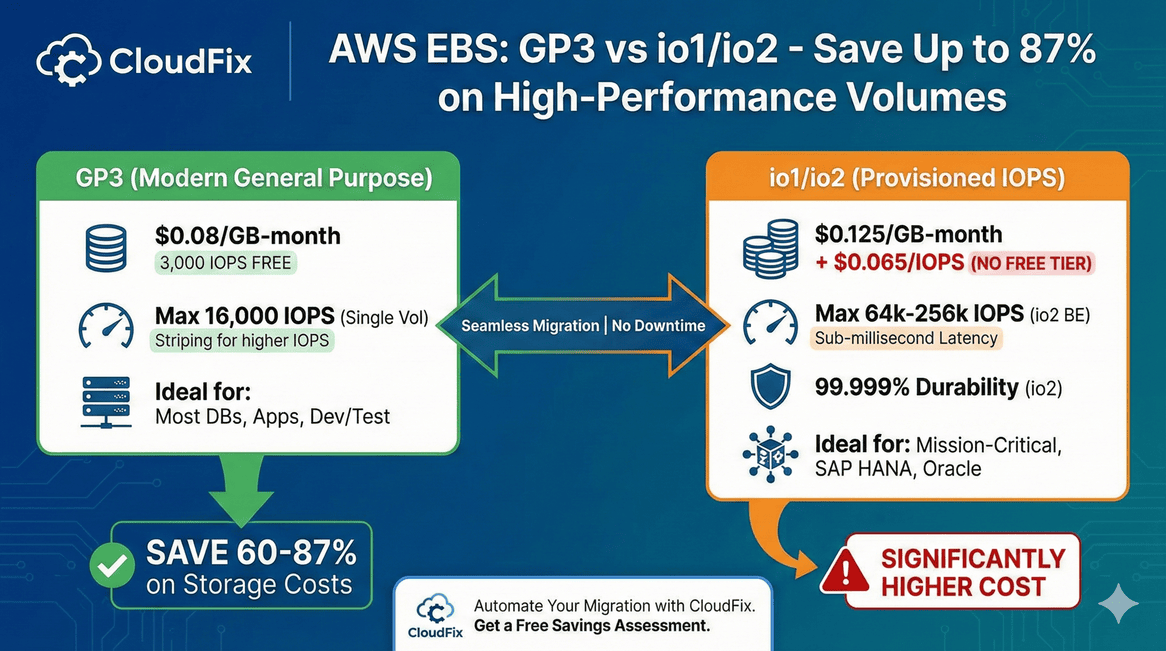
GP3 volumes can replace io1/io2 volumes in most scenarios and save you 60-87% on storage costs. Unless you need more than 16,000 IOPS or 99.999% durability, you’re probably overpaying for io1/io2.
The io1 and io2 volume types are AWS’s highest-performing storage options. They’re also the most expensive and most often over-provisioned. Many workloads using io1/io2 don’t actually need that level of performance or durability.
This guide covers when GP3 can replace io1/io2, how to calculate your savings, and how to migrate without downtime.
GP3 vs io1/io2: Quick Comparison
| Feature | GP3 | io1 | io2 | io2 Block Express |
|---|---|---|---|---|
| Storage Cost | $0.08/GB-month | $0.125/GB-month | $0.125/GB-month | $0.125/GB-month |
| IOPS Cost | 3,000 free, then $0.005/IOPS | $0.065/IOPS | $0.065/IOPS (tiered) | $0.065/IOPS (tiered) |
| Max IOPS | 16,000 | 64,000 | 64,000 | 256,000 |
| Max Throughput | 1,000 MB/s | 1,000 MB/s | 1,000 MB/s | 4,000 MB/s |
| Durability | 99.8-99.9% | 99.8-99.9% | 99.999% | 99.999% |
| Max Volume Size | 16 TB | 16 TB | 16 TB | 64 TB |
| Multi-Attach | No | Yes | Yes | Yes |
| Latency | Single-digit ms | Single-digit ms | Sub-millisecond | Sub-millisecond |
The key differences:
- io2 offers 10x better durability (99.999% vs 99.9%)
- io1/io2 support up to 64,000 IOPS (GP3 maxes at 16,000)
- io1/io2 support Multi-Attach for shared storage
- GP3 costs dramatically less for equivalent IOPS
Why io1/io2 Costs So Much More
The cost difference comes down to IOPS pricing.
GP3 includes 3,000 IOPS free. Additional IOPS cost $0.005 each.
io1/io2 charges $0.065 per IOPS with no free tier are 13x more expensive per IOPS.
Example: 5 TB volume with 6,000 IOPS and 500 MB/s throughput
| Component | GP3 | io2 |
|---|---|---|
| Storage | 5,000 GB × $0.08 = $400 | 5,000 GB × $0.125 = $625 |
| IOPS | 3,000 additional × $0.005 = $15 | 6,000 × $0.065 = $390 |
| Throughput | 375 MB/s additional × $0.04 = $15 | Included |
| Total | $430/month | $1,015/month |
GP3 costs 42% of io2 for the same specifications. That’s a 58% savings.
For higher IOPS workloads, the gap widens:
Example: 1 TB volume with 10,000 provisioned IOPS
| Volume Type | Monthly Cost |
|---|---|
| GP3 | $80 (storage) + $35 (7,000 extra IOPS) = $115 |
| io1/io2 | $125 (storage) + $650 (10,000 IOPS) = $775 |
GP3 costs 85% less than io1/io2 at the same IOPS level.
io1/io2 is usually the biggest EBS waste we find.
Most teams over-provision IOPS by 5-10x. This checklist covers 32 AWS cost optimizations — including how to spot over-provisioned volumes in your own accounts.
When to Use GP3 Instead of io1/io2
Use GP3 if:
- Your workload needs 16,000 IOPS or less
- Standard durability (99.8-99.9%) is acceptable
- You don’t need Multi-Attach
- Consistent single-digit millisecond latency is sufficient
This covers most database workloads, application servers, and development environments.
Keep io1/io2 if:
- You need more than 16,000 IOPS per volume
- Your application requires 99.999% durability
- You need Multi-Attach for clustered storage
- Sub-millisecond latency is required
Typical io2 use cases: SAP HANA, large Oracle/SQL Server databases, high-frequency trading systems.
Scaling Beyond 16,000 IOPS with GP3
GP3’s 16,000 IOPS limit sounds restrictive, but you can work around it with volume striping (RAID 0).
Example: Database requiring 90,000 IOPS
Using multiple GP3 volumes striped together:
| Configuration | Volumes | IOPS | Monthly Cost |
|---|---|---|---|
| GP3 (RAID 0) | 6 × 2 TB | 6 × 16,000 = 96,000 | 6 × $223 = $1,338 |
| io2 | 4 × 3 TB | 4 × 22,500 = 90,000 | 4 × $1,830 = $7,320 |
Same performance, 82% lower cost with GP3.
Most modern database engines (Oracle ASM, PostgreSQL, MySQL) handle striped volumes without issues.
Real-World Savings: 4-Node Oracle Database
Here’s a calculation from an actual customer scenario:
Requirements: 4 nodes, 12 TB storage per node, ~90,000 IOPS per node
| Configuration | GP3 | io2 Block Express |
|---|---|---|
| Volumes per node | 6 | 4 |
| Storage per volume | 2 TB | 3 TB |
| IOPS per volume | 16,000 | 22,500 |
| Total IOPS per node | 96,000 | 90,000 |
| Volume cost | $223 | $1,830 |
| Node cost | $1,341 | $7,321 |
| 4-node cluster cost | $5,364/month | $29,284/month |
Annual savings: $287,040
GP3 costs 18% of io2 Block Express while delivering equivalent IOPS.
How to Migrate io1/io2 to GP3
Migration requires no downtime. AWS modifies volumes in place.
Pre-Migration Checklist
- Verify IOPS requirements: Check CloudWatch metrics to confirm actual IOPS usage
- Confirm durability needs: Is 99.999% durability actually required? Do you work for NASA?
- Check for Multi-Attach: GP3 doesn’t support shared volumes
- Calculate target specs: Determine IOPS and throughput for GP3
Using AWS Console
- Go to EC2 → Elastic Block Store → Volumes
- Select the io1/io2 volume
- Click Actions → Modify Volume
- Change Volume Type to gp3
- Set IOPS (up to 16,000) and Throughput (up to 1,000 MB/s)
- Click Modify
Using AWS CLI
aws ec2 modify-volume \
  --volume-id vol-1234567890abcdef0 \
  --volume-type gp3 \
  --iops 10000 \
  --throughput 500
Migration Timing
- Modifications complete live with no downtime
- Typical completion: Under 6 hours for 1 TB
- Large volumes may take up to 24 hours
- Performance maintained during transition
Common Questions
Will I notice a performance difference?
For workloads under 16,000 IOPS, no. GP3 and io1/io2 have the same single-digit millisecond latency for standard operations. io2 Block Express offers sub-millisecond latency, which matters for specific high-frequency workloads.
What about durability?
GP3 offers 99.8-99.9% durability. io2 offers 99.999%. For context, industry-standard SSDs have around 1% annual failure rates. Both are extremely reliable. The question is whether you need five-nines durability for your specific workload.
Can I migrate back to io1/io2?
Yes. Volume type changes are reversible using the same modification process.
Do I need to stop my instance?
No. EBS Elastic Volumes allows in-place modification without detaching the volume or stopping the instance.
What if I need more than 16,000 IOPS?
Use volume striping (RAID 0) to aggregate multiple GP3 volumes. This is cheaper than io2 in almost all scenarios.
Should I migrate RDS databases too?
Yes. CloudFix has a separate fixer for RDS io1/io2 to GP3 migrations. The same cost savings apply.
Migrate at Scale with CloudFix
Identifying io1/io2 volumes that can migrate to GP3 requires checking IOPS usage, durability requirements, and Multi-Attach status across all your accounts. Doing this manually is tedious and error-prone.
CloudFix automatically:
- Scans all accounts for io1/io2 volumes
- Analyzes CloudWatch metrics to verify IOPS requirements
- Calculates potential savings for each volume
- Excludes volumes that genuinely need io1/io2 capabilities
- Migrates approved volumes via AWS Change Manager
CloudFix targets volumes where:
- Provisioned IOPS ≤ 16,000
- Volume cost exceeds $100/month
- The volume is elastic (launched after November 2016)
- The volume isn’t short-lived (active for at least 7 days)
Get a free savings assessment to see how much you’re overspending on io1/io2 volumes.
Related Resources:
-
- GP2 vs GP3: 20% Cheaper Storage Migration Guide
- Aurora I/O-Optimized vs Standard: Break-Even Calculator
- AWS Cost Optimization Checklist: 32 Fixes to Reduce Spend
AWS EBS Volume Types
- AWS EBS Pricing
- CloudFix Support: io1/io2 to GP3 Migration
- GP2 vs GP3 Migration Guide
- S3 Intelligent Tiering: Storage Cost Savings
- Aurora I/O-Optimized vs Standard: When to Switch
- AWS Cost Optimization Checklist (32 items)
What if you’re overpaying by 87% on more than just EBS?
We’ve seen teams save $287K/year on io2 migrations alone. CloudFix finds every opportunity across your entire AWS footprint. Free assessment in 24 hours.
Related Articles
-
<
- AWS Cost Optimization: The Complete Guide to Lowering Your Cloud Bill (2026)
- AWS Cost Optimization Tools: The Complete Comparison Guide (2026)
- GP2 vs GP3 AWS: 20% Cheaper, Faster IOPS — Full Cost Comparison
- CloudFix Finder/Fixer: RDS Optimize Storage
li>DynamoDB Standard-IA: Save 60% on Storage Costs (2026 Guide)