DynamoDB Standard-IA cuts storage costs by 60% for infrequently accessed data. Here's how to identify the right tables and switch without code changes.
DynamoDB Standard-IA: Save 60% on Storage Costs (2026 Guide)

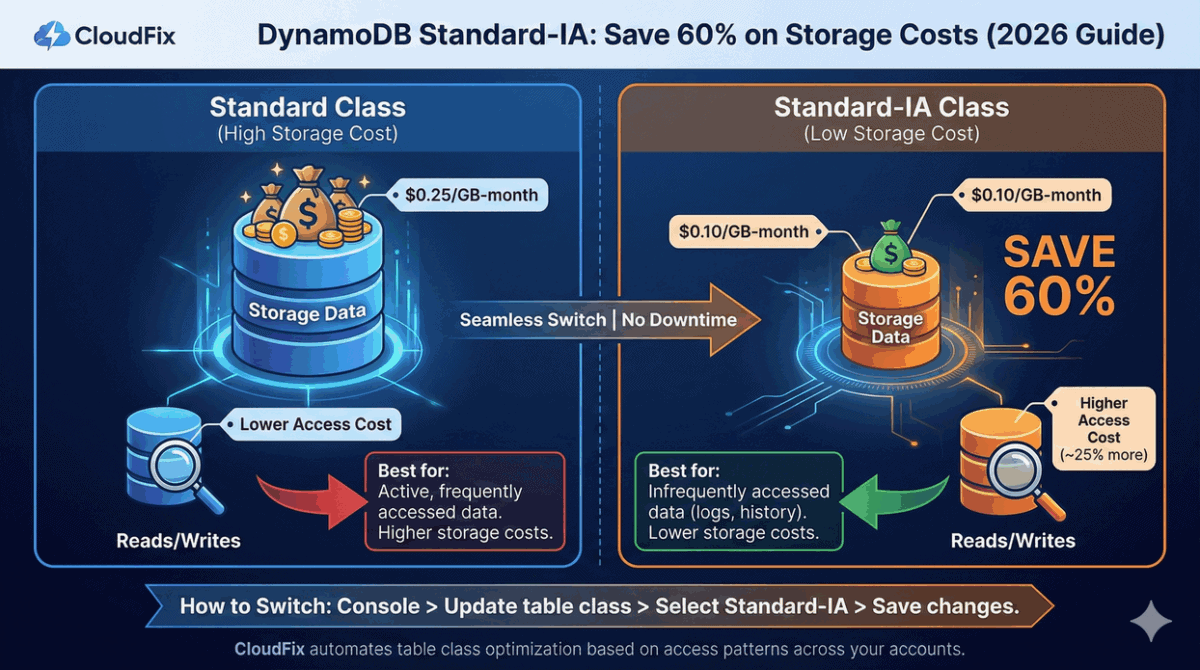
DynamoDB Standard-IA reduces storage costs by 60% compared to the standard table class. If you have tables storing data that’s rarely accessed such as logs, order history, old user data, you’re overpaying by keeping them in the default Standard class.
The tradeoff is simple: Standard-IA costs less for storage ($0.10/GB vs $0.25/GB) but more for reads and writes (~25% higher). For tables where storage is the dominant cost, the math works heavily in favor of Standard-IA.
This guide covers when to use DynamoDB Standard-IA, how to calculate potential savings, and how to migrate tables without downtime or code changes.
DynamoDB Standard vs Standard-IA Pricing
| Component | Standard | Standard-IA | Difference |
|---|---|---|---|
| Storage | $0.25/GB-month | $0.10/GB-month | 60% less |
| Read (On-Demand) | $0.25/million RRUs | $0.31/million RRUs | 24% more |
| Write (On-Demand) | $1.25/million WRUs | $1.56/million WRUs | 25% more |
| Read (Provisioned) | $0.00013/RCU-hour | $0.00016/RCU-hour | 23% more |
| Write (Provisioned) | $0.00065/WCU-hour | $0.00081/WCU-hour | 25% more |
Prices for us-east-1. First 25 GB free for Standard class.
Key insight: Standard-IA makes sense when storage costs exceed ~50% of your total table costs.
When to Use Standard-IA
Good candidates for Standard-IA:
- Application logs stored for compliance
- E-commerce order history older than 90 days
- User activity data rarely queried
- Historical gaming achievements
- Old social media posts
- Audit trails and archived records
Keep in Standard:
- Active session data
- Shopping carts and in-progress orders
- Frequently queried user profiles
- Real-time analytics tables
- Any table with high read/write activity relative to size
DynamoDB is just one of 8 database optimizations in our checklist.
RDS storage migrations, idle cluster cleanup, Aurora I/O-Optimized — we’ve compiled 30+ AWS cost optimizations with exact “how to spot this” guidance for each.
See the Optimizations →Calculating Your Savings
The decision formula is straightforward:
Savings = (0.6 × storage cost) – (0.25 × access cost)
If this number is positive, switch to Standard-IA.
Example Calculations
| Table | Storage (GB) | Monthly Reads | Monthly Writes | Standard Cost | Standard-IA Cost | Savings |
|---|---|---|---|---|---|---|
| OrderHistory | 500 | 5M | 1M | $127.50 | $53.53 | 58% |
| UserActivity | 200 | 50M | 10M | $75.00 | $42.05 | 44% |
| SessionData | 50 | 500M | 100M | $262.50 | $295.80 | Use Standard |
OrderHistory: Storage-dominated table. Perfect for Standard-IA.
UserActivity: Moderate access, still storage-heavy. Standard-IA wins.
SessionData: Access-heavy table. Keep in Standard.
Real-World Case Study
AWS provides this example in their documentation:
Workload: 1.2 TB storage, 42.5M reads, 42.5M writes monthly
| Class | Storage | Access | Total |
|---|---|---|---|
| Standard | $293.75 | $31.87 | $325.62 |
| Standard-IA | $120.00 | $39.74 | $159.74 |
Monthly savings: $165.88 (51%)
How to Switch Table Classes
Switching from Standard to Standard-IA requires no downtime, no data migration, and no code changes. It’s a configuration change.
Using AWS Console
- Open the DynamoDB console
- Select your table
- Click Actions → Update table class
- Select DynamoDB Standard-IA
- Click Save changes
The change takes effect immediately.
Using AWS CLI
aws dynamodb update-table \
  --table-name YourTableName \
  --region us-east-1 \
  --table-class STANDARD_INFREQUENT_ACCESS
To switch back to Standard:
aws dynamodb update-table \
  --table-name YourTableName \
  --region us-east-1 \
  --table-class STANDARD
Limitations
- You can only change table class twice per 30 days
- Reserved Capacity doesn’t apply to Standard-IA tables
- Global Secondary Indexes (GSIs) automatically use the same class as the base table
Finding Tables to Migrate
Identifying which tables should switch requires analyzing storage vs access costs. You can do this manually using the Cost and Usage Report (CUR) or AWS Cost Explorer.
Quick Method: Cost Explorer
- Go to AWS Cost Explorer
- Filter by Service: DynamoDB
- Group by Usage Type
- Compare
TimedStorage-ByteHrs(storage) vsReadCapacityUnit-HrsandWriteCapacityUnit-Hrs(access)
If storage is more than 50% of total cost for a table, it’s a candidate.
Thorough Method: CUR Query
SELECT
    line_item_resource_id AS table_arn,
    SUM(CASE WHEN line_item_usage_type LIKE '%Storage%'
        THEN line_item_unblended_cost ELSE 0 END) AS storage_cost,
    SUM(CASE WHEN line_item_usage_type LIKE '%CapacityUnit%'
        OR line_item_usage_type LIKE '%RequestUnits%'
        THEN line_item_unblended_cost ELSE 0 END) AS access_cost
FROM your_cur_table
WHERE product_name = 'Amazon DynamoDB'
    AND line_item_usage_start_date >= DATE_ADD('day', -30, CURRENT_DATE)
GROUP BY line_item_resource_id
HAVING storage_cost > (access_cost * 0.5)
This returns tables where storage exceeds 50% of access costs – these are your Standard-IA candidates.
Frequently Asked Questions
Does switching to Standard-IA affect performance?
No. Standard-IA provides identical latency, throughput, durability, and availability as Standard tables. The only difference is pricing.
Can I switch back from Standard-IA to Standard?
Yes. Use the same process (console or CLI). Changes take effect immediately. Remember the 2x per 30 days limit.
What about Global Tables?
Global Tables work with both table classes. Each replica can be in either Standard or Standard-IA, and you can change classes independently per replica.
Does Standard-IA work with On-Demand and Provisioned capacity?
Yes. Standard-IA works with both capacity modes. The storage savings and access cost increases apply equally.
What’s the break-even point?
Generally, if storage costs exceed 50% of your total table costs, Standard-IA saves money. The exact threshold varies slightly by region and capacity mode.
Can I use Reserved Capacity with Standard-IA?
No. Reserved Capacity is only available for Standard tables with Provisioned capacity. If you have Reserved Capacity commitments, factor this into your decision.
Do I need to change my application code?
No. Switching table classes is purely a configuration change. Your application continues working exactly the same way.
How long does the switch take?
The change takes effect immediately. There’s no migration or downtime.
What about TTL-deleted items?
TTL (Time to Live) works the same way in both classes. Expired items are deleted automatically at no charge.
Does this apply to Local Secondary Indexes?
LSIs use the base table’s storage and are included in the table’s storage costs. GSIs have their own storage costs and follow the base table’s class.
Automate with CloudFix
Finding the right tables across multiple accounts, calculating savings, and tracking which tables have already been optimized is tedious manual work.
CloudFix continuously:
- Analyzes all DynamoDB tables across your accounts
- Calculates storage vs access cost ratios
- Identifies tables that would save money in a different class
- Switches tables automatically (respecting the 2x/month limit)
- Reverses decisions if access patterns change
The CloudFix fixer works bidirectionally. If a table’s access patterns increase and Standard becomes cheaper, CloudFix switches it back.
Get a free savings assessment to see how much you’re overspending on DynamoDB storage.
Related Resources:
- AWS DynamoDB Standard-IA Documentation
- DynamoDB Pricing
- CloudFix Support: DynamoDB Infrequent Access
Which of your DynamoDB tables should be on Standard-IA?
CloudFix analyzes access patterns across all your tables and identifies exactly which ones will save money. Free assessment shows your total DynamoDB savings.