CloudFix Feature
GP2 vs GP3 AWS: 20% Lower EBS Cost + Faster Baseline IOPS
See the real difference between GP2 and GP3 on AWS, including cost, baseline IOPS, throughput, and how to migrate without downtime.
Part of our complete AWS Storage Cost Optimization guide.
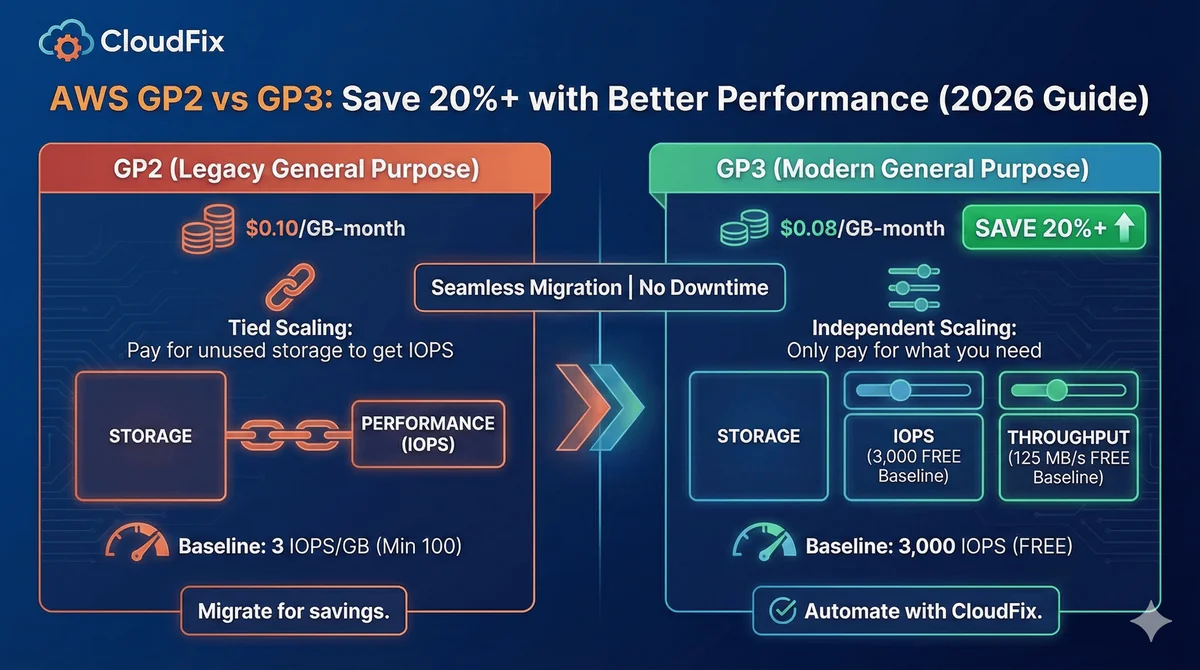
Quick Answer: Switch to GP3. It’s ~20% cheaper than GP2 and gives a decoupled 3,000 IOPS baseline, so you stop paying for storage just to buy performance. GP2 only matches GP3’s IOPS at exactly 1 TiB; below 1 TiB GP3 wins on price and speed; above 1 TiB GP3 is still cheaper. The migration is instant, with no downtime.
Don’t want to check hundreds of volumes by hand? CloudFix scans your AWS account for GP2 volumes worth migrating, shows the savings, and applies the change automatically: you approve, we fix it. See your numbers in a free AWS savings assessment.
What Changed: Why GP3 Replaces GP2
AWS launched GP3 in December 2020 as the successor to GP2. GP3 delivers better baseline performance at a lower price point, with the option to independently scale IOPS and throughput without increasing storage size.
The key difference: GP2 ties IOPS to volume size (3 IOPS per GiB), meaning you overpay for storage just to get performance. GP3 decouples them entirely.
GP2 vs GP3: Side-by-Side Comparison
| Feature | GP2 | GP3 |
|---|---|---|
| Price | $0.10/GiB-month | $0.08/GiB-month |
| Baseline IOPS | 3 IOPS/GiB (variable) | 3,000 IOPS (fixed) |
| Max IOPS | 16,000 | 80,000 |
| Burst IOPS | Up to 3,000 (volumes under 1 TiB) | No bursting (3,000 baseline always) |
| Throughput | 128-250 MiB/s | 125 MiB/s baseline |
| Provisioned IOPS | Not available | Up to 80,000 ($0.005/IOPS above 3,000) |
| Provisioned Throughput | Not available | Up to 2,000 MiB/s ($0.04/MiB/s above 125) |
| Multi-attach | No | No |
When GP3 Wins
- Small volumes (under 1 TiB): GP3 gives you 3,000 IOPS flat. A 100 GiB GP2 volume only gets 300 IOPS. That’s a 10x performance boost for less money.
- Large volumes (over 1 TiB): GP3 costs 20% less per GiB. Period. No trade-off.
- Bursty workloads: GP3 doesn’t use burst credits: its 3,000 IOPS baseline is available all the time. GP2 volumes under 1 TiB can burst to 3,000 IOPS only while their I/O credits last.
- Right-sizing: With GP3, you size storage for storage, not for IOPS. Buy exactly what you need.
When GP2 Might Still Make Sense
Honestly, not often. AWS itself recommends GP3 for most workloads. GP2 only matches GP3’s baseline IOPS at exactly 1 TiB. Below that, GP3 wins. Above that, GP3 still wins on price.
The one edge case: volumes between 1-3 TiB where you need consistent IOPS above 3,000 but below what the GP2 formula delivers. Even then, you’re usually better off on GP3 with provisioned IOPS.
Cost Comparison: Real Numbers
Here’s what a 500 GiB boot disk costs:
- GP2: 500 × $0.10 = $50/month, 1,500 IOPS
- GP3: 500 × $0.08 = $40/month, 3,000 IOPS
Same price tier at 1 TiB:
- GP2: 1,000 × $0.10 = $100/month, 3,000 IOPS
- GP3: 1,000 × $0.08 = $80/month, 3,000 IOPS
At 1 TiB you get the same IOPS for $20/month less. Below 1 TiB it’s cheaper AND faster.
How to Migrate: GP2 to GP3
Single Volume (AWS CLI)
aws ec2 modify-volume
  --volume-id vol-0abc123def456
  --volume-type gp3
The change is instant. No snapshot, no stop, no downtime. AWS handles the migration in the background.
Doing this across a fleet by hand is tedious. CloudFix finds every GP2 volume in your account, calculates the savings, and migrates them in a single approval, no scripting, no downtime.
All Volumes at Scale (CloudFix)
For organizations with hundreds or thousands of volumes across multiple accounts, doing this manually is impractical. CloudFix discovers every GP2 volume, calculates the savings, and executes the migration across your entire AWS estate.
Frequently Asked Questions
Does migrating GP2 to GP3 cause downtime?
No. The retyping happens in-place with zero downtime. Performance may briefly drop during the actual migration (usually under an hour), but the volume stays fully available.
Can I go back to GP2 from GP3?
Technically yes, via the same modify-volume call. But there’s no reason to go back to a more expensive, lower-performance volume type.
What about io1 and io2?
io1/io2 are provisioned IOPS volumes for databases and latency-sensitive workloads. Most people using them for general compute should be on GP3 instead. See our GP3 vs io1/io2 comparison for the breakdown.
Does CloudFix handle other EBS optimizations?
Yes. CloudFix finds and fixes unused EBS snapshots, over-provisioned volumes, missing encryption, and right-sizing on GP3.
Related AWS Cost Optimization Guides
- GP3 vs io1/io2: When to Use Provisioned IOPS
- Aurora I/O-Optimized vs Standard: Break-Even Calculator
- S3 Intelligent-Tiering: Setup and Savings
- AWS Cost Optimization Checklist: 32 Fixes to Reduce Spend
Bottom Line
GP3 is faster, cheaper, and more flexible than GP2. If you’re still running GP2 volumes, you’re leaving money on the table. The migration is safe, fast, and requires no application changes.
For a single account with a few dozen volumes, the AWS CLI approach works fine. For organizations managing hundreds of volumes across multiple accounts, CloudFix automates the discovery, analysis, and migration at scale.
Related Articles
- AWS Cost Optimization: The Complete Guide to Lowering Your Cloud Bill (2026)
- AWS Cost Optimization Tools: The Complete Comparison Guide (2026)
- DynamoDB Standard-IA: Save 60% on Storage Costs (2026 Guide)
- GP3 vs IO2: Up to 87% Cheaper, Real AWS Pricing Benchmarks (2026)
- CloudFix Finder/Fixer: RDS Optimize Storage